 DarkWebsite.link
Explainer
What is Tor and how does it work?
Tor is free, open-source software and a network of volunteer-run relays. It sends your traffic through three relays, with layered encryption, so the site you visit cannot see your real IP address and your internet provider cannot see which site you visit.
The name
Tor began as "The Onion Router". Traffic is wrapped in layers of encryption like the layers of an onion, and each relay peels off one layer. The software is maintained by the Tor Project, a US non-profit. Its sites are in our Tor Project onion links.
The three hops
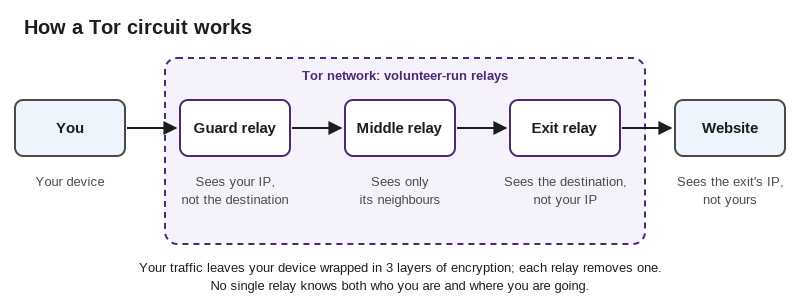
- Guard (entry) relay: sees your IP address but not where your traffic is going. Tor Browser keeps the same guard for a long time on purpose, which the Tor Project explains in its guide to guard relays.
- Middle relay: sees only the relays on either side of it.
- Exit relay: sends your traffic to the ordinary website. It sees the destination but not who you are.
No single relay knows both who you are and what you are doing. For onion services the traffic never uses an exit relay and stays inside Tor.
What Tor protects
- Your IP address from the sites you visit.
- Which sites you visit from your internet provider and anyone watching your local network. They can see that you use Tor, unless you use a bridge.
- Your browsing from simple tracking, because Tor Browser works to make every user look alike.
What Tor does not protect
- What you sign in to. If you log in to an account with your name, the site knows who you are.
- What you type. Do not enter your real name or details into a site you do not trust.
- Your device. Malware or a weak system defeats Tor.
- Unencrypted traffic at the exit. The exit relay can read traffic to sites without HTTPS. Tor Browser's HTTPS-Only Mode helps.
Our guide Is Tor safe? covers the real risks in more depth.
Tor Browser: more than a browser with Tor
Tor Browser is the Tor Project's own browser. It is free and open source, and the Tor Project warns that any "Tor Browser" you are asked to pay for is fake. Besides sending traffic through Tor, it is built to resist tracking:
- Fingerprinting defences such as letterboxing and user-agent spoofing make users look alike to websites.
- Separate circuits per site: two different sites that use the same tracker are loaded over different Tor circuits, so the tracker cannot tell both visits came from you.
- New Identity closes all tabs and windows, clears cookies and history, and switches to new circuits, so what you do next cannot be linked to what you did before.
- Security levels (Standard, Safer and Safest) and HTTPS-Only Mode cut down what attackers can exploit.
You can see the relays your current tab uses in the circuit diagram in the site information menu in the address bar. Your guard relay changes only every two to three months, to protect against profiling; the other relays change as you visit new sites.
Who uses it
Journalists, activists, researchers, people in countries with internet censorship, domestic abuse survivors, and ordinary people who do not want to be tracked. For measured network data see Tor Metrics.
Tor and the dark web
Tor is the technology. The dark web is one thing people use it for, by visiting onion services. Much Tor traffic goes to ordinary sites. See what is the dark web, Tor vs VPN and I2P vs Tor.
Frequently asked questions
- Is Tor legal?
- In most countries, yes. Some countries block or restrict it. What you do while using Tor is subject to the same laws as anywhere else.
- Does Tor make you completely anonymous?
- No. It hides your IP address and breaks the link between you and the sites you visit, but it cannot protect you from your own behaviour, such as logging in to an account with your name.
- Who runs the Tor network?
- Volunteers around the world run the relays. The Tor Project, a non-profit, maintains the software, but it does not control the relays.
- Is Tor slow?
- Often slower than a direct connection, because traffic passes through three relays run by volunteers.
Sources
Checked 23 November 2026. We cite primary sources wherever possible; see our editorial policy.
- Tor Project: History
- Tor Project: About Tor (support)
- Tor Project: Understanding guard relays
- Tor Project: Fingerprinting protections
- Tor Project: Managing identities
- Tor Project: Cost to use Tor Browser
- Tor Project: Secure connections and HTTPS-Only Mode
- Tor Metrics
Related guides
Looking for addresses? See our 50 verified .onion links, or check one with the onion address checker.