 DarkWebsite.link
Deep dive
How onion services work
An onion service is a website or app that is reachable only through Tor. The visitor and the server each build their own Tor circuit to a meeting point inside the network, so neither learns the other's IP address and no exit relay is involved.
The problem it solves
With normal Tor use, the website sees an exit relay's address instead of yours, but the website's own location is public. An onion service hides the site's location too.
The steps
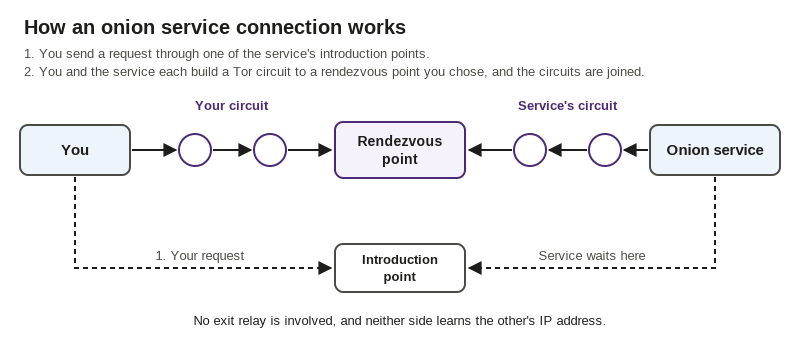
- Publishing. The service picks a few relays as introduction points and builds Tor circuits to them. It publishes a signed descriptor listing those points in a distributed directory run by Tor relays.
- Looking up. When you enter the .onion address, Tor Browser fetches the descriptor.
- Meeting. Your browser picks a relay as a rendezvous point and tells the service about it through an introduction point.
- Connecting. The service builds its own circuit to the rendezvous point, and the two circuits are joined there.
The path is roughly twice as long as a normal Tor connection, and no relay on it can see both ends.
What you get
- Location privacy for both sides. The server never reveals its IP address.
- End-to-end encryption without needing a certificate. The address is the key.
- Censorship resistance. A blocked clearnet site can offer an onion address, as the BBC and DW do.
- Not discoverable by default. Version 3 services are designed so the directory cannot be used to list them. An onion site is found only if someone publishes its address, which is why onion search is hard.
Onion services vs ordinary websites
| Ordinary website over Tor | Onion service | |
|---|---|---|
| Server location | Public | Hidden |
| Exit relay | Used, and can see the site you visit | Not used |
| Encryption | Depends on the site using HTTPS | End to end, always |
| Proof of identity | A certificate, if HTTPS | The address itself is the key |
| Works in ordinary browsers | Yes | No, needs Tor Browser |
| Found by search engines | Yes | Only if the address is published |
What you see in Tor Browser
- An onion icon in the address bar when you are on an onion site. Tor Browser uses different onion icons to show how secure the connection is.
- ".onion available" on some ordinary websites. The site has told Tor Browser its onion address through an Onion-Location header; click it to switch.
- A gray key icon on an onion service that requires client authorization. Some services are private: only people given a private key can open them, and Tor Browser asks you to enter it.
- A specific error message when an onion site cannot be reached, which helps you tell a mistyped address from a service that is offline.
Limits
- Onion services are usually slower because of the longer path.
- A badly configured service can still leak its identity through its content or software. The Tor Project's setup guide covers the common mistakes; so does our hosting guide.
- Your safety still depends on your own habits. See the safety guide.
Frequently asked questions
- What is a Tor hidden service?
- An older name for an onion service: a site or app reachable only over Tor that also hides its own server location.
- Do onion services use exit relays?
- No. Traffic stays inside the Tor network from visitor to service.
- Do I need HTTPS on an onion address?
- Not for encryption, because Tor already encrypts end to end. Some sites still use HTTPS so a certificate ties the address to an organization.
Sources
Checked 23 November 2026. We cite primary sources wherever possible; see our editorial policy.
- Tor Project: Understanding onion services in Tor Browser
- Tor Project: Set up your onion service
- Tor Project: Onion-Location
Related guides
- What is a .onion link?
- How to host an onion site
- What is Tor and how does it work?
- Dark web search engines
Looking for addresses? See our 50 verified .onion links, or check one with the onion address checker.